
Text message (SMS) consent — AWP Installer Training
Who receives texts
Only AWP employees and subcontracted installers whom AWP has added to AWP Installer Training. They are told about the app by AWP and install it on their own phone.
How they opt in
- The person opens the AWP Installer Training app and chooses Phone on the sign-in screen.
- They enter their own mobile number. Directly under the Send code button the app shows the consent statement below.
- They tap Send code. Only then is a single text message sent, containing a one-time sign-in code.
No text is ever sent unless the person requests a code in the app. Phone numbers are not collected for any other purpose, and no marketing or promotional messages are sent.
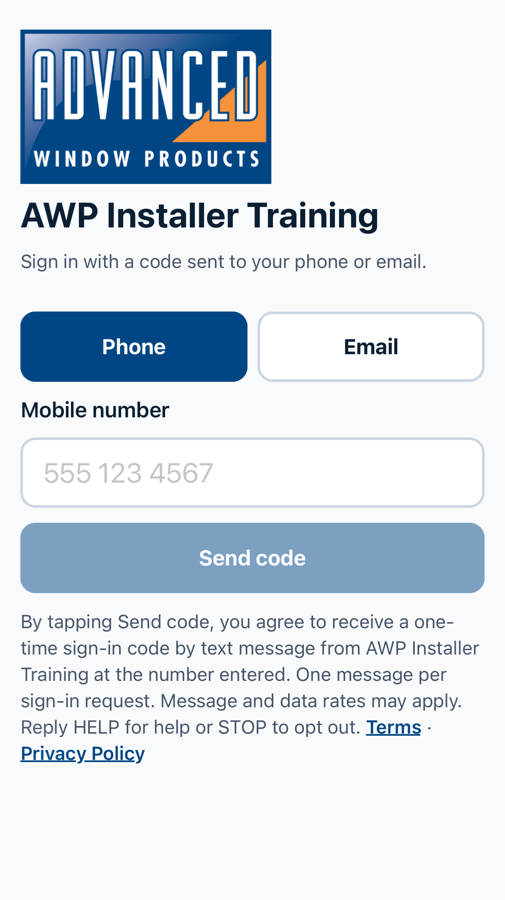
Consent statement shown in the app
By tapping Send code, you agree to receive a one-time sign-in code by text message from AWP Installer Training at the number entered. One message per sign-in request. Message and data rates may apply. Reply HELP for help or STOP to opt out. Terms · Privacy Policy
Example message
Your AWP Installer Training code is 123456. It expires in 10 minutes. Do not share it.
Frequency, cost and opting out
- Frequency: one message each time the person requests a sign-in code.
- Cost: message and data rates may apply.
- Opt out: reply STOP to stop receiving texts. Reply START to receive them again. While opted out, the person cannot receive sign-in codes by text; they can contact AWP for help signing in.
- Help: reply HELP, or contact support@advancedwindows.com / 801-886-8000.